Portfolio and Website Updates: Incorporating Feedback

An update to a previous post on the feedback I received from friends and acquaintances on my portfolio, and ongoing work.

I’ve been making updates to my portfolio and website, and I have even more updates to report. In this post, I want to go a little deeper on some of the feedback I received from friends and acquaintances, and how that has influenced some of my updates.

I’ll continue to make updates, of course. These are just changes I’ve made so far.

My Initial Reaction

I asked most people to review my portfolio, which is on CargoCollective. When I got the feedback, my emotions ranged between feeling overwhelmed and disappointed.

I was overwhelmed with what I had received, which was not all negative, because I felt that I’d wasted so many first impressions.

For months, I’ve been sending out links to my portfolio and not getting anywhere with it. Despite my hard work with updating my resume, including the time I spent gathering tips, I felt I had ultimately been short-changing myself by sending out a lackluster portfolio. It felt like a huge waste of time. I even felt like a fraud, giving out tips at the NYC UX Camp 2019.

It was disappointing that other people weren’t seeing my vision or hadn’t understood the history how this site came to be. But, you know, people only reviewed what I asked them to review. They weren’t providing holistic direction on how to reframe my image as a designer. And they weren’t evaluating anything a hiring manager wouldn’t evaluate, either. In other words, it wasn’t personal.

In any case, after a few days (or hours), I started thinking about how I could make changes. My personal website, alliwalk.com, actually went through a whirlwind of changes, large and small. And then I started focusing on my portfolio.

So let’s go through some of the top feedback and how I addressed it.

The Feedback: 1-2-3

The 3 biggest areas of feedback centered on:

  • Domain: Using a real domain name, instead of a third party site.
  • List of projects: Feeling overwhelmed by the number of projects; not sure where to start; emphasizing the projects.
  • About: Adding a tagline or a paragraph to the home page to give a sense of who I am.

Now I’ll go through these top 3 pieces of feedback and give my thoughts, and what I did (or didn’t) do to address them.

1.Personal Domain

Jared Spool gave a talk at BostonCHI in Jan 2019, about the difficulty of hiring designers. In the talk, he called out employers who discriminate against candidates who use third-party sites like Wix or other CMS tools.

Specifically, in his example, he recounts an encounter with a design leader who felt that “good designers” should be able to code and would have coded their own websites. The video is linked to this point in the presentation.

If you’re reading this on my blog, it’s clear that I do have my own domain. I also have own website and I did code it myself.

The reasons I coded my own site were not to prove myself as a “good” designer. They were due to: a) cost, and; b) exploration/personal expression. Let’s review:

A. Cost: It’s cheaper to code your own website on your own domain than to pay a 3rd-party site to do it. A site that costs $12/mo is $112/year, which is over $500 after 5 years, assuming you keep it running all that time. Many sites cost more than $12/month. About five years ago, when I first created my site in Bootstrap, I needed to find areas to cut back on my expenses. This was an easy choice to make and I’ve stuck with it.

B. Exploration: As mentioned above, about five years ago, I started seriously learning more about front-end development. I used building my portfolio and a few side projects as opportunities to learn. I like designing my own website. So why am I also using Cargo? Because updating a domain can be a small project but updating a CMS takes a few minutes.

I could use my own domain to host an external website, but it feels like giving up control of my own website. And, I’m not sure that the external template available is what I want to use on my own site. Plus I get control over my own analytics.

Ultimately, I won’t be moving the Cargo portfolio to my domain. But, I did update my website to more prominently point to the portfolio.

2. List of Projects

I admit: I do have a lot of projects. I’ve heard that using 3-5 projects is a must. I don’t know if that’s a max of 5, but I’d definitely heard a minimum of 3.

Even the NN/g article that prompted this redo suggests 3-5 projects:

Step 2: Choose 3–5 Projects as Detailed Case Studies

But I want to share an image from the NN/g article on UX portfolios. It depicts a gallery of projects.
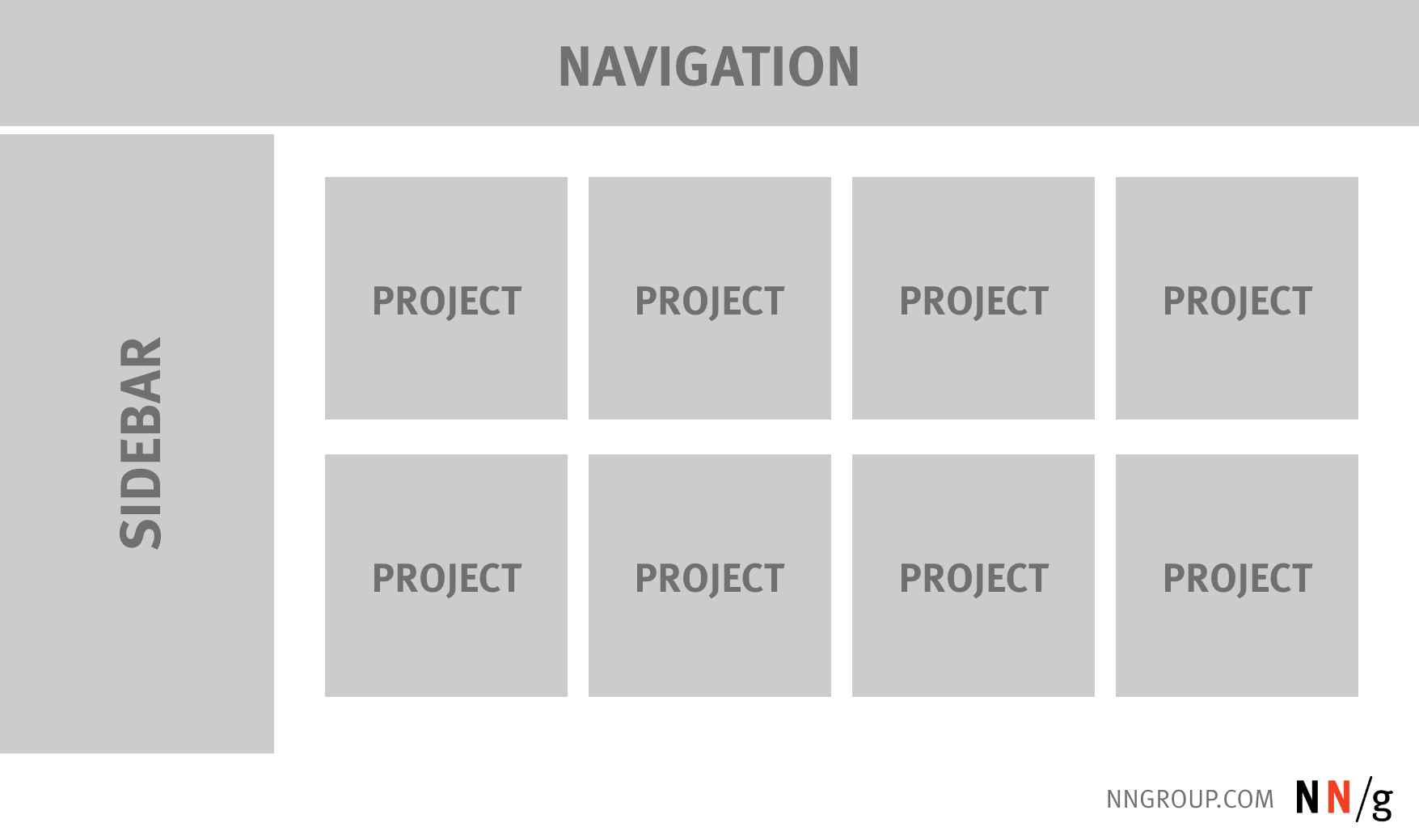
Web PortfolioHow many projects do you see? I see 8. Clearly the maximum number of projects is not hard-limited to 3-5.

At the moment, I may have too many at 11. However, the first 3 projects are the same as from my website. And on my website, I used analytics to narrow the list from 6-7, to 3 based on visitor traffic.

Most people view a website in an F shape. Using that logic, my most popular projects are placed first. This doesn’t mean I shouldn’t continue trying to narrow the list. But there’s clearly some discrepancy what’s too many, and my choice of projects and the order they’re presented have some thought behind them.

Providing Signposts with the Writing

To help address the feedback that people might be feeling lost, within each project page, I have been working on improving the writing. As mentioned in my last post, I’m updating the writing make it easier for people to scan.

I’ve made changes such as:

  • Incorporated images at the top of projects, when appropriate. (Suggested by feedback.)
  • Organized the writing a bit better. The format is now: a) description; b) images.
  • Included additional promo information, like videos, for people to find more information if wanted.
  • Used more headings, lists, and bold text.

My hope is that even if people feel like they don’t know where to start, once they do, they will feel more directed.

3. About

I used to have an About Me page on my website, alliwalk.com. I removed it because analytics showed that very few people ever visited the page.

But, two respondents mentioned making About info more prominent, like right on the homepage. They asked about adding a heading sub-title or adding a paragraph above the project.

Unfortunately, those are not options I can pursue due to limitations of the CMS template. There are other changes I can make:

A. Using a Landing Page: The template does allow me to select any page as the landing page, even if that page is not public. (Public pages do not show in the nav in the template I’m using.) So I am working on creating a landing/about page, but it’s not something I can easily test without it immediately going live. So, I’m being very cautious.

B. Improving “About”: While working on the writing and updating images, I have updated how I described myself on both my website and my portfolio. I used a combination of my resume and cover letter. I also provided answers to a few questions I tend to get in interviews, like:

  • Are you more of an information architect or visual designer?
  • Do you typically work full-time or freelance?

I just wove that information into the writing itself, and then I put the same information on both my website and my portfolio.


Still more to go. I haven’t made much progress on my website regarding the responsive images, semantic HTML, or migrating to Bootstrap 4.

And, coincidentally, I recently participated in a virtual session with Google, on their design review process. I learned a few things…which is for another post.


Portfolio and Website Updates

After reading a Nielsen Norman Group article on UX Portfolios, I recently began a process of updating my own portfolio and website. Here is a recap and plans for the future.

I have begun a process of updates for my website at alliwalk.com and an additional portfolio at cargocollective.com/alliwalk.

Here are changes in mind for the portfolio and the website.


Portfolio Updates

Changes for my portfolio began after I read a Nielsen Norman Group article on UX Portfolios. The article is called 5-Steps to Creating a UX-Design Portfolio. The 5 steps are:

  1. Take Inventory of All Your Projects
  2. Choose 3–5 Projects as Detailed Case Studies
  3. Choose Your Desired Format
  4. Create Your Portfolio
  5. Get Feedback and Iterate

Implementing the Tips & Other Updates

Take Inventory

Given my work on improving my resume, I’ve already taken some inventory of what I feel I’m good at and what differentiates me from other designers.

3-5 Projects

But I do have a lot of projects. Far more than 3-5 as recommended. So that’s been difficult to evaluate objectively.

Writing

I also took a second look at the writing and how I described my projects. And I’ve decided to focus on improving the content so it’s ideal for the web.

  • Hemingway App helped to simply sentences and eliminate long words
  • Lists help get points across in an easier to scan format.

A short course I’ve been referencing is available on Lynda.

Styles

Styles aren’t part of the list, but I made a few changes:

  • I used Coolors to use find colors that complement each other
  • Use HSL instead of HEX values

Feedback

I’ve asked a friend, a new contact, and an acquaintance for feedback on my portfolio. Not everyone has responded with their take, but I’ve already begun making edits.

Upcoming

I plan to continue making more changes and improvements, to the order of each project and the writing.


Also, Website Updates

Some big changes here….

I recently made some pretty drastic updates to my website.

Style, Images, Content

  • Using Coolors to get a complementary color palette
  • Adding SVGs from UnDraw.co
  • Updating the content: Removed CSS projects; Added an “About” section

That’s it for now, but there are more changes I still want to make.

More Changes I Want to Make

Remove IDs

3-4 years ago when I first made this site, I didn’t know the difference between IDs and Classes. Now I do and I want to update the HTML to use the correct tags.

Add Responsive Images

The technique now is to use responsive images, using srcset and sizes. A how-to is available on MDN.

Update to Bootstrap 4

Although I think I’m OK with Bootstrap 3, it would be a good idea to update to the newest version. Bootstrap 4 uses Flex by default and possibly Grid.

Optimize the SVGS for Animation

In order to add animations to SVGs, the different paths and shapes need to be given names. Moving the styles out of the code means colors and other styles can be animated.

Animate the SVGs

After optimizing the SVGs, I can add some animations.

Create a CSS Experiments page

The site used to have a section for CSS animations. But I took that out to focus the page on just one message. I plan to put everything I removed onto a new page/section.

Domain Email

I’ve got a domain but I’m not using the email for it. This isn’t really a website thing, just a professional thing.

Happy to report, this is done!


I plan to write another post about some of the feedback and ongoing changes.

Notes on “Holding Yourself Accountable”

Here again is another recap of my notes on a Lynda course. This course was called “Holding Yourself Accountable”. I confess that I first thought this course would be really cheesy. But it actually came in handy for me. You can read about that at the end.

As will all posts with my notes about Lynda videos, what follows is not a comprehensive recap of the video. These are just notes I took while watching. If you’re curious about the individual videos, click through to the course page and check it out.

Introduction
Dorie explains the difference between accountability and responsibility: Responsibility refers to what actions it is your job to do. Accountability is being held to account for actions; ownership. Regardless of position.
Accountability Mindset

Why focus on accountability? Think about what you want people to say about you when you leave a room.

  1. What kind of person do you want to be?
  2. What are the consequences of no accountability. What are the consequences of you being accountable? If you stepped up.
  3. Seek positive examples
Prioritize Correctly
  • Don’t work on stuff that’s not important to the company or boss.
  • Strategically prioritize.
  • Think about your future.
Set Expectations — Don’t over-promise.
  • Use time-tracking tools and techniques to help keep track of your tasks. Use the results to see how long a task took.
  • Manage expectations of others.
  • Share obstacles in advance.
Learn to Focus
  • Everyone gets bored. It’s not necessarily bad to be bored.
  • Have to be willing to give up things we value.
  • Use something like “Pomodoro” to work in 25min sprints. 4 sprints, then one longer break.

Pomodoro works in 6 steps:

  1. Decide on the task to be done.
  2. Set the pomodoro timer (traditionally to 25 minutes).[1]
  3. Work on the task.
  4. End work when the timer rings and put a checkmark on a piece of paper.[5]
  5. If you have fewer than four checkmarks, take a short break (3–5 minutes), then go to step 2.
  6. After four pomodoros, take a longer break (15–30 minutes), reset your checkmark count to zero, then go to step 1.

Find out more: https://francescocirillo.com/pages/pomodoro-technique


Excuses vs Obstacles
  1. Write it down.
  2. Look for patterns. Might be imposing a world view.
  3. Look for solutions. Convince colleagues to work on a project.
Systems for Success
  • Stickk.com
  • End meetings with a recap to help clarify next steps and who is accountable for what outcomes.
  • Use “I always…” or “I never…” to set boundaries. For instance, “I always exercise in the morning.” If you go on a business trip, book a hotel with a gym and bring your gym clothes, etc.
  • Look for equipment solutions, if needed.
  • These tools could be free or paid.
Get Help to Hold Yourself Accountable
  • Create a mastermind group. A group of peers, friends, mentors….
  • Get an accountability partner.
  • Review who you spend time with: Who are the 5 people you spend time with? These people have a lot of influence on your life/behavior.
Pickup After Failure

Get back on track by:

  • Understanding why the failure occurred.
  • Bounce back soon after it occurred – with a tangible, concrete action.
  • Don’t let a small misstep become an excuse for a bigger one. Ex: Don’t “mouth off” to colleagues because you’re in a bad mood.
  • Overcome failure with grace.
Celebrate Successes
  • But be strategic.
  • Don’t celebrate everyday, but enough to avoid burnout.
  • See Tony Schwartz for more on burnout.
Embrace the Identity of Accountability
  • Let positive actions and positive self-conception become a feedback loop. You’re an accountable person because you’re accountable
  • Be someone others can rely on.
  • Be more than just responsible; accountable.

Conclusion: How has this course helped me?

On a recent client project, I had trouble getting the client to commit to dates. And the client was often slow to respond to emails. It would have been easy to let my frustrations overtake my emotions and allow myself to let the project lapse and the timeline go on and on.

But I told myself that I wanted the project to succeed. I was going to make sure it happened. Using this course and the lessons from another course, I focused on the outcome I wanted. I composed emails that made my short and long term goals clear. The client responded and the project eventually concluded successfully. I am now looking forward to my next opportunity to display accountability in personal and professional projects.

Notes on Writing Formal Business Letters and Emails

In a few posts, I’m doing a write-up of my notes following a Lynda course. This course is less than 40 min, but I thought it had some good tips, shown below.


Define Your Goals
  • First a short-term goal (or want), then the longer term goal.
  • Short-term goal is something you want someone to do right away. Action items; “Call me at…”
  • Long-term goal is what you want them to do for a bigger purpose. “I’m looking for help on….”
Research
  • Researching your topic: For instance, if replying to a job description use the language in the job post in your correspondence.
  • Researching your correspondent: Maybe you can find someone specific to send your correspondence to by searching for people on LinkedIn, Twitter, etc. When reaching out, “My research shows you’re the best person to contact. If not…”.
For Tone

The presenter suggested using a website like bab.la for phrases, especially in other languages.

Getting to the Point
  • Put the goal up front
  • Remove confusing details
  • Rearrange and check punctuation
  • Cut out unnecessary words
Phrasal Verbs vs Direct Verbs; Idioms
  • Be direct. The second phrases below are indirect and passive:
    • “I analyzed…” vs “I looked over…”
    • “I hope to…” vs “I had been hoping…”
  • Idioms: Just write it out. Idioms can be misunderstood or misinterpreted.
Follow-Up: TAP – Timeline, Alternatives, Peskiness
  • Timeline: Do you need to follow up because you need an answer?
  • Alternatives: Can you get this info from another source?
  • Peskiness: What will be the downside of following up?

Remember: Don’t assume malice or argue.

Here’s an example: I’m afraid I didn’t get a response to our letter on June 15 about booth space. A prompt reply would be appreciated as we are trying to finalize our travel arrangements. Thank you.

Rule of Thumb for Following Up
  • Don’t follow through using multiple venues. Don’t follow up through email, phone, LinkedIn, etc.
  • If you send an email and get no reply, it’s OK to ask via one other outlet if someone got your email. But don’t bombard them on LinkedIn and Twitter and phone, etc.
  • This was a tip for me, because I had been thinking the more the better!
Continuing the Conversation
  • Keep note of other email addresses, and other people in a CC.
  • People can be generous, if they’re asked. Just be polite.
3 Takeaways
  • Be concise
  • Cooperate
  • There’s a person on the other end
Final Tip

If you ever find yourself stuck with what to say, try recording yourself speaking then transcribing your message.